Tuesday, September 24, 2013

Generating a Student ID with crystal reports and MySQL database

crystal reports are not much hard as you think.when we got into it,it is really no big deal.here i am going to explain how we can generate class ID using crystal reports.I learnt about crystal reports deeply because of my 3rd year SEP project in my campus(SLIIT).Now i have considerable knowledge of crystal reports as i did it many times with customizing.So if you want to know crystal reports,what you should do is create every possible ways by customizing reports.

1.First we should create a table or view according to data fields we need to generate the report.Following shows a view which i used to create a A/L class ID for my client.


2.Then we should add a data set to access actual database values through the crystal report.here in visual c# items we can find a field as data and there we have data set item.it is xsd file.just give a name.but it is good to give a name which explains the data set.

3.then we get a window like below.here i added my view to the window by drag and drop.first you need to expand "Server Explorer" from "View" menu in visual studio.then it will show all available connections with database server.i selected "SIMS_" as my database which i have my data for the report.there i selected view named "idstudentview" and drag it to window and dropped.


4.Then i created a new windows form and i should add crystal report viewer to it.you can find crystal report viewer from tool box under "Reporting" section.drag and drop it to the windows form.


5.After adding crystal report viewer this is what you can see.left side column we can use to add another tools if we need.right side column is where you are going to generate the report.


6.Here i added few combo boxes,radio buttons,labels and buttons according to my purpose.I want to create IDs for A/L students by selecting A/L year and the stream.and also i want to create single ID by giving student ID.so that i created those group boxes. 


7.Then we should add crystal report by clicking arrow which is shown in step 5 image right side.if not we can add manually using tool box.

8.After clicking "create a new crystal report" following window will appear.we should give a name here.


9.Then it will show a window like below.there we can select fields from field explorer.by right clicking in design view we can customize report in many ways.

here this image shows how can we change "stdimage" blob value field.Like this other fields also can change


10.also in field explorer by right clicking on "database fields" we can have following database expert window and also we can data sets at this point also.


11 This is what i designed in my crystal report design view.


12. We can change displaying methods also.here when we select format with multiple columns we can have columns with same kind of data fields .but different values


13.In generate report button click event we should write the code to connect database and the report together through data set.

This method will return MySQL data adapter object and we can use it to create report
         public static MySqlDataAdapter Getadapter(string qry)
        {
            try
            {
                comm.CommandText = qry;
                MySqlDataAdapter dr = new MySqlDataAdapter(comm);

                return dr;
            }
            catch (Exception)
            {
                return null;
            }
            finally
            {
                // comm.Cancel();
            }
                  
    } 

//Then we can add following code to button click event.i wrote the method for "Bulk IDs" generate part.

          string query = "select * from idstudentvw where stdalyear='"+cmbAlYear.Text+"' and                                          stdstream='"+CmbStramreport.Text+"' "; //query which returns data fields for report

           MySqlDataAdapter  adapter = access.GetAdapter(query);

            backgrounddata ds = new backgrounddata(); //this is data set
            dra.Fill(re.Tables[0]);
            backgroundreport cry = new backgroundreport(); //this is crystal report
            cry.SetDataSource(re);
            crystalReportViewer1.ReportSource = cry; //this is crystal report viewer
            crystalReportViewer1.Refresh();

Then this is what we get after generate report.this is individual report generating.

This is bulk id generating report.


So ,that's all we should do to create crystal report.we can have different kind of reports.i just upload another few reports which i created for my projects.

a) 1st page 


2)2nd page


3)3rd page


Wednesday, September 18, 2013

Test your website with NETSPARKER

Netsparker is the only False-positive-free web application security scanner. Simply point it at 
your website and it will automatically discover the flaws that could leave you dangerously exposed.

1)first you need to download software using below link
2)Then run the software giving administrative permission(picture a,b,c,d)
  
Picture (a)

Picture(b)

Picture(c)

Picture(d)


   3)Now You have the software.You need to add URL of your website in the tab which below shows


4)Directly clicking on start scan button will work fine.if you want you can change options by expanding the menu "Options"


 5)They will scan whole website separating to 3 parts.(Crawling/Crawling and Attacking/Re-Crawling)
This image display crawling and attacking part


 6)Also We can view issues in 4 separate ways as Vulnerability,Severity,Confirmation and URL.


This image shows vulnerability of email in the website


This shows severity of the web page accroding to recognized issues


 7)We can customize settings as required.


 8)This tool shows how much we need to concern about those security issues by considering real factors

1.0)confirmed Error

2.0)Web view of confirmed Error


 We can have many benefits using this tool like ,
                    No need to waste time double-checking reported vulnerabilites. Netsparker do it for you.
                    At a glance reporting - discover just how good (or not) your security really is.
                    Actionable insights - learn exactly what you need to do to fix your problems.


Monday, September 9, 2013

My 1st HACKATHON Experience


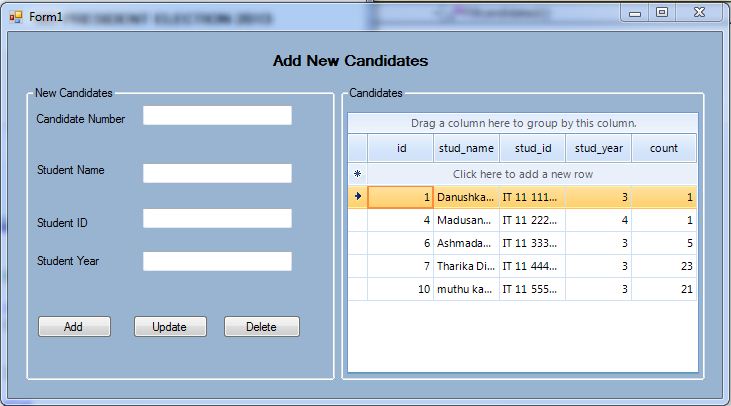
This is my my 1st application which i have done as hackathon. They gave us nearly 3 hours and it was 4 member group project. what i have done during those 4 hours was developing client application and server application accroding to given requirements.we selected SOA + 3 tier as our development architecture and My sql as main database approach with C# language..it is really small application.but the thing is developing it successfully during the given time frame.following interfaces will briefly describes what i did there.The application was about voting system to select a president to SIS(a student community) committe.

CLIENT SIDE
1.Login screen(Using this screen all selected candidates for voting will login to the system)


2.Voting screen(After successfully logged to the system those users can vote for any person they like by selecting one candidate from given table.)


SERVER SIDE
3.Admin screen(Admin can add new candidates and view current results of the election )


4.Candidates screen(Admin can add candidates and mean time edit,delete functions also possible)


5.Report -part1(This is the results of election.it will show all the candidates names along count of their votes.)


6.Report-Part 2(graphical view of the report .easily can get an understanding who is the winner.)


Sunday, May 5, 2013

The Biggest Sql statement which i used..

This is the biggest query i used during my development life up to now.this query retrieves students with their ranks.when two students got same marks they are having same rank and next person will be 1 after their rank.so this query gives practical ranking functionality.


set @totalS = 0;
select count(*) into @totalS from exammarks;
SELECT exammarks.stdid, (exammarks.Test1 + exammarks.Test2 + exammarks.Test3 + exammarks.Test4)/4 AS avge, @curRank :=
IF(@prevVal=(exammarks.Test1 + exammarks.Test2 + exammarks.Test3 + exammarks.Test4)/4, @curRank, @studentN) AS rank,
@percentile := IF(@prevVal=(exammarks.Test1 + exammarks.Test2 + exammarks.Test3 + exammarks.Test4)/4, @percentile,
(@totalS - @studentN + 1)/(@totalS)*100) as percent,
@studentN := @studentN + 1 as studentN,
@prevVal:=(exammarks.Test1 + exammarks.Test2 + exammarks.Test3 + exammarks.Test4)/4 as totagain
FROM exammarks, (
SELECT @curRank :=0, @prevVal:=null, @studentN:=1, @percentile:=100
) r
ORDER BY (exammarks.Test1 + exammarks.Test2 + exammarks.Test3 + exammarks.Test4)/4 DESC

Saturday, May 4, 2013

IOS Easy Apps

IOS apllications are not much hard when we used to develop them.those are few small apps which i used to create.You can try them out by coping and pasying those codes to relavant classes.

 Animation
.h

#import <UIKit/UIKit.h>
@interface AnimationViewController : UIViewController {
    IBOutlet UIView *mover;
    IBOutlet UIView *grower;
    IBOutlet UIView *changer;
}

@property(nonatomic,retain)UIView *mover;
@property(nonatomic,retain)UIView *grower;
@property(nonatomic,retain)UIView *changer;

-(IBAction)move;
-(IBAction)grow;
-(IBAction)change;
@end


.m

#import "AnimationViewController.h"
@implementation AnimationViewController
@synthesize  grower,changer,mover;

-(IBAction)move
{
    [UIView beginAnimations:nil context:NULL];
    [UIView setAnimationDuration:3.0];
    [UIView setAnimationRepeatCount:5];
      changer.backgroundColor = [UIColor orangeColor];
    CGPoint cPoint=mover.center;
    cPoint.y=220.0f;
     mover.center=cPoint;
     [UIView commitAnimations];
}

-(IBAction)change
{
    [UIView beginAnimations:nil context:NULL];
    [UIView setAnimationDuration:3.0];
    [UIView setAnimationRepeatCount:5];
    changer.backgroundColor = [UIColor redColor];
    [UIView commitAnimations];
}
-(IBAction)grow
{
    [UIView beginAnimations:nil context:NULL];
    [UIView setAnimationDuration:3.0];
    [UIView setAnimationRepeatCount:5];
     CGRect a=grower.bounds;
    a.size.height=200.0f;
    a.size.width=200.0f;
     grower.bounds=a; //assigning bounds tot he shapes
    [UIView commitAnimations];
  }
- (void)dealloc
{
    [super dealloc];
}

- (void)didReceiveMemoryWarning
{
    // Releases the view if it doesn't have a superview.
    [super didReceiveMemoryWarning];
    // Release any cached data, images, etc that aren't in use.
}
#pragma mark - View lifecycle
/*
// Implement viewDidLoad to do additional setup after loading the view, typically from a nib.

- (void)viewDidLoad
{
    [super viewDidLoad];
}
*/

- (void)viewDidUnload
{
    [super viewDidUnload];
    // Release any retained subviews of the main view.
    // e.g. self.myOutlet = nil;
}

- (BOOL)shouldAutorotateToInterfaceOrientation:(UIInterfaceOrientation)interfaceOrientation
{
    // Return YES for supported orientations
    return (interfaceOrientation == UIInterfaceOrientationPortrait);
}

@end


ColorPicker
.h

#import <UIKit/UIKit.h>
@interface Lab2ViewController : UIViewController
<UIPickerViewDelegate,UIPickerViewDataSource>
{
  NSArray *colors;
   IBOutlet UIPickerView * colorPicker;
}
@property(nonatomic,retain) UIPickerView *colorPicker;
@end

.m

#import "Lab2ViewController.h"
@implementation Lab2ViewController
@synthesize colorPicker;
//methods for UIPickerViewDataSource
-(NSInteger)numberOfComponentsInPickerView:(UIPickerView *)pickerView{
    return 1;
}
-(NSInteger)pickerView:(UIPickerView *)pickerView numberOfRowsInComponent:(NSInteger)component{
    return colors.count;
}
-(NSString *)pickerView:(UIPickerView *)pickerView titleForRow:(NSInteger)row forComponent:(NSInteger)component{
    return [colors objectAtIndex:row];
}
-(void)pickerView:(UIPickerView *)pickerView didSelectRow:(NSInteger)row inComponent:(NSInteger)component{
    UIColor *newColor;
    switch (row){
            case 0:case 1: case 2:
                newColor = [UIColor yellowColor];
                break;
            case 3: case 4: case 5:
                newColor = [UIColor grayColor];
                break;
            case 6: //case 7:
                newColor = [UIColor blackColor];
                break;
        default:
            newColor = [UIColor redColor];
            break;
    }
    self.view.backgroundColor = newColor;
}
- (void)dealloc
{
    [super dealloc];
}
- (void)didReceiveMemoryWarning
{
    // Releases the view if it doesn't have a superview.
    [super didReceiveMemoryWarning];
   
    // Release any cached data, images, etc that aren't in use.
}
#pragma mark - View lifecycle
// Implement viewDidLoad to do additional setup after loading the view, typically from a nib.
- (void)viewDidLoad
{
    colors = [[NSArray alloc]initWithObjects:@"Blue",@"Yellow",@"Pink",
                                             @"Fine",@"Tired",@"Maudlin", @"Purple",@"Green",nil];
  [super viewDidLoad];
}
- (void)viewDidUnload
{
    [super viewDidUnload];
    // Release any retained subviews of the main view.
    // e.g. self.myOutlet = nil;
}
- (BOOL)shouldAutorotateToInterfaceOrientation:(UIInterfaceOrientation)interfaceOrientation
{
    // Return YES for supported orientations
    return (interfaceOrientation == UIInterfaceOrientationPortrait);
}@end


 Database
.h

#import "/usr/include/sqlite3.h"
@interface databasesqliteViewController : UIViewController {
    UITextField  *name;
    UITextField  *address;
    UITextField  *phone;
    UILabel  *status;
   
    NSString  *databasePath;
    sqlite3  *contactDB;
    }

@property (retain, nonatomic) IBOutlet UITextField *name;
@property (retain, nonatomic) IBOutlet UITextField *address;
@property (retain, nonatomic) IBOutlet UITextField *phone;
@property (retain, nonatomic) IBOutlet UILabel *status;

-(IBAction)saveData;
-(IBAction)findContact;
@end


.m

#import "databasesqliteViewController.h"
@implementation databasesqliteViewController
@synthesize name, address, phone, status;
- (void) saveData
{
    sqlite3_stmt *statement;
     const char *dbpath = [databasePath UTF8String];
      if (sqlite3_open(dbpath, &contactDB) == SQLITE_OK) {
                NSString *insertSQL = [NSString stringWithFormat:@"INSERT INTO CONTACTS (name, address, phone) VALUES (\"%@\", \"%@\", \"%@\")", name.text, address.text, phone.text];
               const char *insert_stmt = [insertSQL UTF8String];
              sqlite3_prepare_v2(contactDB, insert_stmt, -1, &statement, NULL);
             if (sqlite3_step(statement) == SQLITE_DONE) {
                  status.text = @"Contact added";
            name.text = @"";
            address.text = @"";
            phone.text = @"";   
        }
        else
        {
            status.text = @"Failed to add the contact";
        }
       

        sqlite3_finalize(statement);
        sqlite3_close(contactDB);
    }
    }
- (void) findContact
{
        sqlite3_stmt *statement;
        const char *dbpath = [databasePath UTF8String];
        if (sqlite3_open(dbpath, &contactDB) == SQLITE_OK) {
              NSString *insertSQL = [NSString stringWithFormat:@"INSERT INTO CONTACTS (name, address, phone) VALUES (\"%@\", \"%@\", \"%@\")", name.text, address.text, phone.text];
          const char *insert_stmt = [insertSQL UTF8String];
           sqlite3_prepare_v2(contactDB, insert_stmt, -1, &statement, NULL);
            if (sqlite3_step(statement) == SQLITE_DONE) {
             status.text = @"Contact added";
            name.text = @"";
            address.text = @"";
            phone.text = @"";   
        }
        else
        {
            status.text = @"Failed to SEARC the contact";
        }
          sqlite3_finalize(statement);
        sqlite3_close(contactDB);
    }
 }
  - (void)dealloc
{
    [super dealloc];
}
  
- (void)didReceiveMemoryWarning
{
    // Releases the view if it doesn't have a superview.
    [super didReceiveMemoryWarning];
        // Release any cached data, images, etc that aren't in use.
}
#pragma mark - View lifecycle
// Implement viewDidLoad to do additional setup after loading the view, typically from a nib.
- (void)viewDidLoad
{
      NSString *docsDir;
    NSArray *dirPaths;
    //get the documents directory
    dirPaths = NSSearchPathForDirectoriesInDomains(NSDocumentDirectory, NSUserDomainMask, YES);
     docsDir = [dirPaths objectAtIndex:0];
     //build the path to the database file
      databasePath = [[NSString alloc] initWithString:[docsDir stringByAppendingPathComponent:@"contacts.db"]];
      NSFileManager *filemgr = [NSFileManager defaultManager];
     if ([filemgr fileExistsAtPath:databasePath] == NO) {
      const char *dbpath = [databasePath UTF8String];
           if (sqlite3_open(dbpath, &contactDB) == SQLITE_OK) {
           char *errMsg;
            const char *sql_stmt = "CREATE TABLE IF NOT EXISTS CONTACTS(ID INTEGER PRIMARY KEY AUTOINCREMENT, NAME TEXT, ADDRESS TEXT, PHONE TEXT)";
          if (sqlite3_exec(contactDB, sql_stmt, NULL, NULL, &errMsg) != SQLITE_OK) {
                 status.text = @"Failed to create table";
            }
            sqlite3_close(contactDB);
        }
        else
        {
            status.text = @"Failed to open/create database";
        }
                }
    [filemgr release];
        [super viewDidLoad];
}
- (void)viewDidUnload
{
    [super viewDidUnload];
    // Release any retained subviews of the main view.
    // e.g. self.myOutlet = nil;
}
- (BOOL)shouldAutorotateToInterfaceOrientation:(UIInterfaceOrientation)interfaceOrientation
{    // Return YES for supported orientations
    return (interfaceOrientation == UIInterfaceOrientationPortrait);
}@end


 Views
.m

#import "mad_lastViewController.h"
@implementation mad_lastViewController
NSArray *myarray;
- (void)dealloc
{
    [super dealloc];
}
- (UITableViewCell *)tableView:(UITableView *)tableView cellForRowAtIndexPath:(NSIndexPath *)indexPath
{
        static NSString *simpleTableIdentifier = @"SimpleTableItem";
      UITableViewCell *cell = [tableView dequeueReusableCellWithIdentifier:simpleTableIdentifier];
        if(cell==nil)
    {
    
        cell = [[UITableViewCell alloc]initWithStyle:UITableViewCellStyleDefault reuseIdentifier:simpleTableIdentifier];
     
    }
       cell.textLabel.text = [myarray objectAtIndex:indexPath.row];
        cell.imageView.image = [UIImage imageNamed:@"Blue hills.jpg"];
    return cell;
    }- (void)didReceiveMemoryWarning
{
    // Releases the view if it doesn't have a superview.
    [super didReceiveMemoryWarning];
        // Release any cached data, images, etc that aren't in use.
}
#pragma mark - View lifecycle
// Implement viewDidLoad to do additional setup after loading the view, typically from a nib.
- (void)viewDidLoad
{
      myarray = [NSArray arrayWithObjects:@"A",@"B",@"C",@"D", nil];
        [super viewDidLoad];
}
- (NSInteger)tableView:(UITableView *)tableView numberOfRowsInSection:(NSInteger)section
{
    return [myarray count];
}
- (void)viewDidUnload
{
    [super viewDidUnload];
    // Release any retained subviews of the main view.
    // e.g. self.myOutlet = nil;
}
- (BOOL)shouldAutorotateToInterfaceOrientation:(UIInterfaceOrientation)interfaceOrientation
{    // Return YES for supported orientations
    return (interfaceOrientation == UIInterfaceOrientationPortrait);
}@end